Neovim
In the terminalela --spec neovim
Tested with Neovim 0.12, headless: the plugin through packpath, and the three lines
without it. The lazy.nvim spec is from lazy.nvim's documentation.
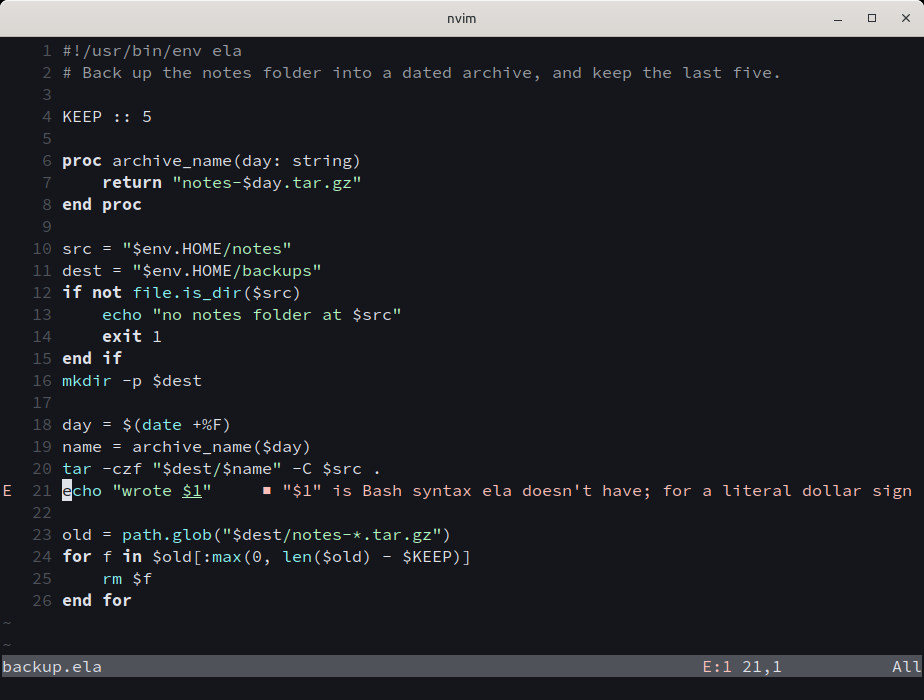
The plugin, in ela-editor, gives *.ela and a script whose first line runs ela the file type
ela, starts ela --lsp for each ela buffer through vim.lsp, sets # comments and
four-space blocks, and colours the buffer with its Vim syntax file until the server's semantic
tokens arrive. It needs Neovim 0.9 or later. :help ela is its help.
With lazy.nvim, from a clone of ela-editor:
{ dir = "~/src/ela-editor", ft = "ela" }ft = "ela" loads it at the first ela buffer; lazy.nvim reads the plugin's ftdetect/ela.lua,
which gives the file type, at start-up. opts is passed to setup:
{ dir = "~/src/ela-editor", ft = "ela", opts = { cmd = { "/usr/bin/ela", "--lsp" } },}With Neovim's own packages and no plugin manager, the clone goes under pack/*/start in a
folder of packpath, here as a link, so a git pull in the clone updates it:
mkdir -p ~/.local/share/nvim/site/pack/ela/startln -s ~/src/ela-editor ~/.local/share/nvim/site/pack/ela/start/ela-editorrequire("ela").setup({ cmd = { "ela", "--lsp" }, lsp = true }) in init.lua changes the
command, or with lsp = false keeps the file type and the syntax without the server.
Neovim 0.11 and later start the server without the plugin, from init.lua, with no colour
before the server answers:
vim.filetype.add({ extension = { ela = "ela" } })vim.lsp.config("ela", { cmd = { "ela", "--lsp" }, filetypes = { "ela" } })vim.lsp.enable("ela")